ให้ docker เก็บ log ไว้ที่ syslog ดีกว่า ไม่ทำอะไร
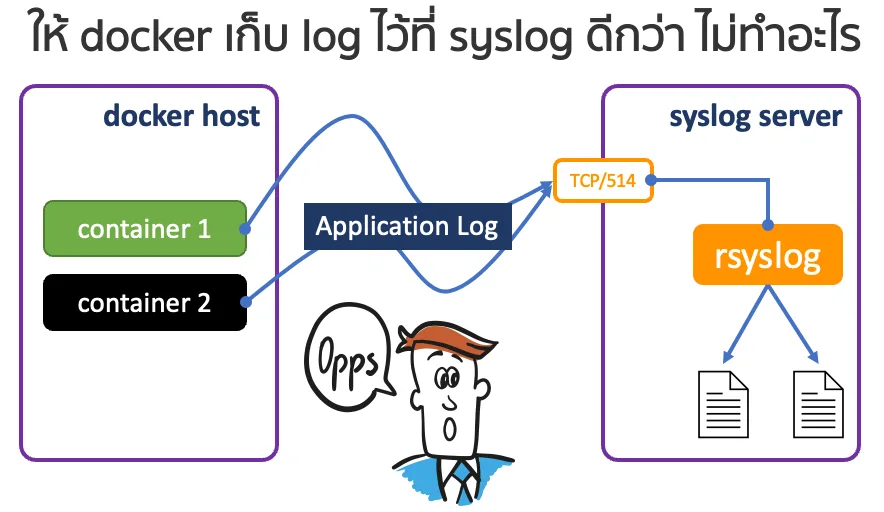
โดยปกติ ถ้าไม่ทำอะไรกับ docker เลย เวลาที่เราสร้าง container แล้วอยากดูว่าโปรแกรมใน container มันทำงานอย่างไร มีปัญหาอะไรไหม หนึ่งในวิธีที่เราทำได้ก็คือใช้คำสั่ง docker logs <container_id> แล้วพอเราสั่งลบ container เราก็ไม่รู้จะไปตามหา log จากที่ไหน log ถูกลบไปด้วย พร้อม ๆ กับ container ไปแล้ว
วิถีปกติ
ผมสร้าง container ตัวหนึ่งโดยใช้ image ของ nginx เป็นพระเอกในบทความนี้ และลองเรียกดู log ที่เกิดขึ้น
hostname ~  > docker -v
Docker version 20.10.12, build 20.10.12-0ubuntu4

hostname ~  > docker container run -d --rm --name nginx -p 80:80 nginx
5ee69ab5553717b651de0374c7f0d44553e1445ee917df83b97eadfb2c080774

hostname ~  > docker logs -f nginx
/docker-entrypoint.sh: /docker-entrypoint.d/ is not empty, will attempt to perform configuration
/docker-entrypoint.sh: Looking for shell scripts in /docker-entrypoint.d/
/docker-entrypoint.sh: Launching /docker-entrypoint.d/10-listen-on-ipv6-by-default.sh
10-listen-on-ipv6-by-default.sh: info: Getting the checksum of /etc/nginx/conf.d/default.conf
10-listen-on-ipv6-by-default.sh: info: Enabled listen on IPv6 in /etc/nginx/conf.d/default.conf
/docker-entrypoint.sh: Launching /docker-entrypoint.d/20-envsubst-on-templates.sh
/docker-entrypoint.sh: Launching /docker-entrypoint.d/30-tune-worker-processes.sh
/docker-entrypoint.sh: Configuration complete; ready for start up
2023/01/02 06:27:23 [notice] 1#1: using the "epoll" event method
2023/01/02 06:27:23 [notice] 1#1: nginx/1.23.3
2023/01/02 06:27:23 [notice] 1#1: built by gcc 10.2.1 20210110 (Debian 10.2.1-6)
[... truncated output ...]
2023/01/02 06:27:57 [error] 30#30: *1 open() "/usr/share/nginx/html/favicon.ico" failed (2: No such file or directory), client: 192.168.254.191, server: localhost, request: "GET /favicon.ico HTTP/1.1", host: "192.168.254.195", referrer: "http://192.168.254.195/"
192.168.254.191 - - [02/Jan/2023:06:27:57 +0000] "GET /favicon.ico HTTP/1.1" 404 555 "http://192.168.254.195/" "Mozilla/5.0 (Macintosh; Intel Mac OS X 10_15_7) AppleWebKit/537.36 (KHTML, like Gecko) Chrome/108.0.0.0 Safari/537.36" "-"
log ที่เห็นเก็บไว้ที่อื่นอีกไหม
มีครับ จริง ๆ แล้วค่าปกติของการจัดการ log ของ docker หรือที่เรียกกันว่า log driver ก็คือ json-file ซึ่งไฟล์นี้จะเก็บอยู่ที่ /var/lib/docker/containers/<container_id>/<container_id>-json.log และที่สำคัญคือ ไฟล์นี้จะถูกลบไปพร้อมกับ container
hostname ~  > docker inspect -f "\{\{ .Id \}\}" nginx
5ee69ab5553717b651de0374c7f0d44553e1445ee917df83b97eadfb2c080774

hostname ~  > CID=$(docker inspect -f "\{\{ .Id \}\}" nginx)
hostname ~  > sudo ls /var/lib/docker/containers/$CID/$CID-json.log
/var/lib/docker/containers/5ee69ab5553717b651de0374c7f0d44553e1445ee917df83b97eadfb2c080774/5ee69ab5553717b651de0374c7f0d44553e1445ee917df83b97eadfb2c080774-json.log

hostname ~  > sudo cat /var/lib/docker/containers/$CID/$CID-json.log
{"log":"/docker-entrypoint.sh: /docker-entrypoint.d/ is not empty, will attempt to perform configuration\n","stream":"stdout","time":"2023-01-02T06:27:23.793803275Z"}
{"log":"/docker-entrypoint.sh: Looking for shell scripts in /docker-entrypoint.d/\n","stream":"stdout","time":"2023-01-02T06:27:23.793827012Z"}
{"log":"/docker-entrypoint.sh: Launching /docker-entrypoint.d/10-listen-on-ipv6-by-default.sh\n","stream":"stdout","time":"2023-01-02T06:27:23.794500821Z"}
{"log":"10-listen-on-ipv6-by-default.sh: info: Getting the checksum of /etc/nginx/conf.d/default.conf\n","stream":"stdout","time":"2023-01-02T06:27:23.82084299Z"}
{"log":"10-listen-on-ipv6-by-default.sh: info: Enabled listen on IPv6 in /etc/nginx/conf.d/default.conf\n","stream":"stdout","time":"2023-01-02T06:27:23.825442382Z"}
{"log":"/docker-entrypoint.sh: Launching /docker-entrypoint.d/20-envsubst-on-templates.sh\n","stream":"stdout","time":"2023-01-02T06:27:23.825618342Z"}
{"log":"/docker-entrypoint.sh: Launching /docker-entrypoint.d/30-tune-worker-processes.sh\n","stream":"stdout","time":"2023-01-02T06:27:23.828134441Z"}
{"log":"/docker-entrypoint.sh: Configuration complete; ready for start up\n","stream":"stdout","time":"2023-01-02T06:27:23.829238856Z"}
{"log":"2023/01/02 06:27:23 [notice] 1#1: using the \"epoll\" event method\n","stream":"stderr","time":"2023-01-02T06:27:23.832350202Z"}
{"log":"2023/01/02 06:27:23 [notice] 1#1: nginx/1.23.3\n","stream":"stderr","time":"2023-01-02T06:27:23.832418889Z"}
[... truncated output ...]
{"log":"2023/01/02 06:27:57 [error] 30#30: *1 open() \"/usr/share/nginx/html/favicon.ico\" failed (2: No such file or directory), client: 192.168.254.191, server: localhost, request: \"GET /favicon.ico HTTP/1.1\", host: \"192.168.254.195\", referrer: \"http://192.168.254.195/\"\n","stream":"stderr","time":"2023-01-02T06:27:57.569741223Z"}
{"log":"192.168.254.191 - - [02/Jan/2023:06:27:57 +0000] \"GET /favicon.ico HTTP/1.1\" 404 555 \"http://192.168.254.195/\" \"Mozilla/5.0 (Macintosh; Intel Mac OS X 10_15_7) AppleWebKit/537.36 (KHTML, like Gecko) Chrome/108.0.0.0 Safari/537.36\" \"-\"\n","stream":"stdout","time":"2023-01-02T06:27:57.570030401Z"}
จะเห็นได้ว่า ข้อมูลในไฟล์ก็จะเป็นข้อมูลเดียวกับ ข้อมูลที่เรียกดูด้วยคำสั่ง
docker logs <container_id>
เตรียม Syslog Server เอาไว้เก็บ log จาก container
syslog ~  >  cat <<-EOF | sudo tee /etc/rsyslog.d/01-container-log.conf
\$template containerLogs,"/var/log/docker/%hostname%_%syslogtag:R,ERE,1,ZERO:.*cname/([^\[]+)--end%.log"

if \$syslogtag contains 'cname'  then -?containerLogs

& stop
EOF

syslog ~  > sudo vi /etc/rsyslog.conf
[ ... truncated output ... ]

# unmark both lines
module(load="imtcp")
input(type="imtcp" port="514")

[ ... truncated output ... ]

syslog ~  > sudo systemctl restart rsyslog
กำหนดให้ log driver เป็น syslog
hostname ~  > vi /etc/docker/daemon.json
{
   "log-driver": "syslog",
   "log-opts": {
           "syslog-address": "tcp://<syslog server ip address>:514",
           "tag": "cname/\{\{.Name\}\}"
   }
}
ตามไปดู log เก็บไว้ที่ไหน
เมื่อกำหนดค่าทั้ง syslog server และ docker host เรียบร้อย ทุกครั้งที่สร้าง container และ container นั้น ๆ มีการส่ง log ออกมา จะมีการส่ง log ไปยัง syslog server และ syslog server จะเขียน log ไว้ที่ /var/log/docker/<docker host name>_<container name>.log
[at Docker Host]
hostname ~  > docker container run -d --rm --name nginx -p 80:80 nginx
093890b14e01cd75f237c990b541556462c68807999cdfa36a20cca75db99101
hostname ~  > docker container ls
CONTAINER ID   IMAGE     COMMAND                  CREATED         STATUS         PORTS                               NAMES
093890b14e01   nginx     "/docker-entrypoint.…"   7 seconds ago   Up 6 seconds   0.0.0.0:80->80/tcp, :::80->80/tcp   nginx

[at Syslog Server]
syslog ~  > sudo ls -la /var/log/docker
total 16
drwxr-xr-x 2 syslog syslog 4096 Jan  2 17:19 .
drwxrwxr-x 9 root   syslog 4096 Jan  2 17:00 ..
-rw-r----- 1 syslog adm    5221 Jan  2 17:21 192.168.254.195_nginx.log
syslog ~  > sudo cat /var/log/docker/192.168.254.195_nginx.log
Jan  2 17:19:58 192.168.254.195 cname/nginx[13453]: /docker-entrypoint.sh: /docker-entrypoint.d/ is not empty, will attempt to perform configuration
Jan  2 17:19:58 192.168.254.195 cname/nginx[13453]: /docker-entrypoint.sh: Looking for shell scripts in /docker-entrypoint.d/
Jan  2 17:19:58 192.168.254.195 cname/nginx[13453]: /docker-entrypoint.sh: Launching /docker-entrypoint.d/10-listen-on-ipv6-by-default.sh
Jan  2 17:19:58 192.168.254.195 cname/nginx[13453]: 10-listen-on-ipv6-by-default.sh: info: Getting the checksum of /etc/nginx/conf.d/default.conf
Jan  2 17:19:58 192.168.254.195 cname/nginx[13453]: 10-listen-on-ipv6-by-default.sh: info: Enabled listen on IPv6 in /etc/nginx/conf.d/default.conf
Jan  2 17:19:58 192.168.254.195 cname/nginx[13453]: /docker-entrypoint.sh: Launching /docker-entrypoint.d/20-envsubst-on-templates.sh
Jan  2 17:19:58 192.168.254.195 cname/nginx[13453]: /docker-entrypoint.sh: Launching /docker-entrypoint.d/30-tune-worker-processes.sh
Jan  2 17:19:58 192.168.254.195 cname/nginx[13453]: /docker-entrypoint.sh: Configuration complete; ready for start up
Jan  2 17:19:58 192.168.254.195 cname/nginx[13453]: 2023/01/02 10:19:58 [notice] 1#1: using the "epoll" event method
[... truncated output ...]
เราจะไม่ทิ้งขว้าง log ของ application ใน container ที่สร้างด้วย docker กันนะครับ